
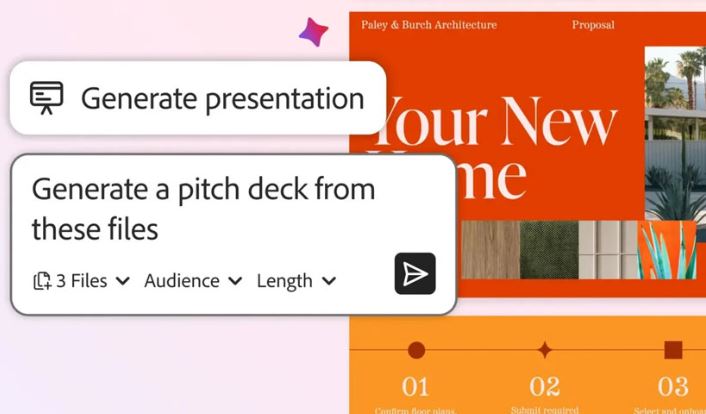
Adobe has announced a fresh wave of AI-powered features for Acrobat and Adobe Express, including the ability to generate audio podcasts directly from PDFs.
The updates are part of Adobe’s broader push to embed generative AI across its creative and productivity tools.
Over the past few weeks, Adobe has rolled out several AI-driven upgrades, including ChatGPT integrations in Photoshop, Acrobat, and Express, along with GPT-Image 1.5 support in Firefly. The latest update adds even more practical, productivity-focused tools.
AI-powered slide creation
With the new “Generate presentation” feature, users can ask Adobe’s AI Assistant to automatically create a full presentation from one or multiple documents.
According to Adobe, users can upload:
Financial reports
Product documents
Competitive research
Web pages
into PDF Spaces, Acrobat’s AI-powered knowledge hub. From there, the AI analyzes the content and builds a presentation that highlights key insights, pain points, and proposed solutions.
The AI first creates an outline and then generates a complete presentation based on user-defined tone, length, and design preferences.
Deep integration with Adobe Express
Adobe says Acrobat and Express work together behind the scenes to build these presentations. Once generated, users can:
Edit text and layouts
Replace images
Change fonts and colors
Add animations to slides
before sharing the final deck with their team.
Prompt-based PDF editing
Adobe is also introducing prompt-based PDF edits, allowing users to modify documents using natural language instructions.
Instead of manually editing content, users can simply tell the AI what they want to change—such as rewriting text, summarizing sections, or adjusting formatting—making PDF editing faster and more accessible.
Turn PDFs Into podcasts
One of the standout features is the ability to generate audio podcasts from PDFs. Users can convert written content into spoken audio, making it easier to consume information on the go.
This feature is especially useful for:
Students and educators
Professionals reviewing long documents
Content creators repurposing written material